Browser extension
Urlyze — Scan Before You Click
Check a link where you meet it, in the tab you're already in, and get a verdict you can read, backed by the same scanning engine as the platform.
Free. No signup needed for community mode.
What it does
Built for the moment before the click.
Scan on demand
Scan the page you're on, or any link on it, without leaving the tab. The verdict comes back in plain language, not a score you have to interpret.
Warns before the paste
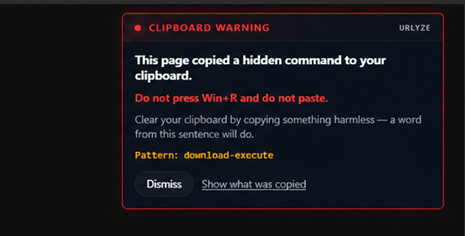
When a page writes to your clipboard without showing you what it wrote, the extension says so at that instant, which is before Win+R and therefore in time.
Your workspace, privately
Add an API key and your scans land in your Urlyze workspace instead of the community pool, with the full report waiting for you there.
Download watch
Scan the source URL a download came from, so you can check where a file actually originated before you open it.
Retry from another region
Some pages only show their real content to certain geographies. Re-run a scan from a different egress region and compare.
Privacy
It does not read your pages.
The extension acts when you ask it to. It does not watch your browsing and it does not collect the pages you visit. You choose the page or the link, and only then does anything get scanned. In API-key mode, what you scan stays inside your own workspace.
Read the privacy policy